Your academy, your admissions desk and your fee counter — in one place.
Teach live and self-paced courses, run tests and issue verifiable certificates, then sell them. Admissions CRM, fees, EMI and GST invoices are built in. Your learners see a branded academy under your name, and your team sees one workspace.
Your team's workspace and your learners' academy, both on your own domain.
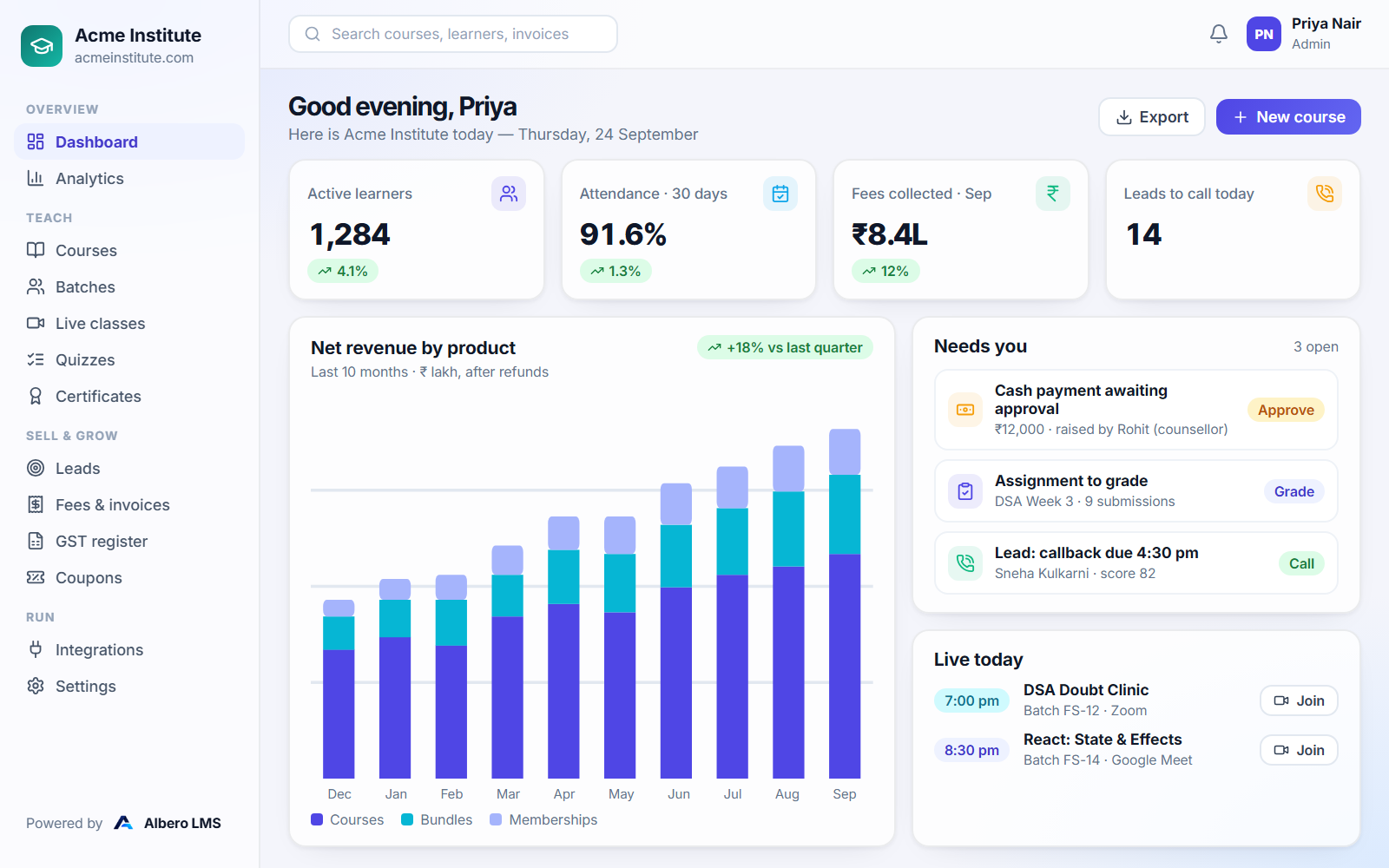
Dashboard preview
Tomorrow morning, on one screen
Learners, attendance, fees and the leads your counsellors should call — with everything waiting on you in one queue.
Your institute, today
Illustrative data
1,284Active learners4.1%
91.6%Attendance1.3%
₹8.4LFees collected this month12%
14Leads to call todaydue today
Net revenue by productLast 10 months · ₹ lakh
DecJanFebMarAprMayJunJulAugSep
Courses
Bundles
Memberships
Needs you3 open
Cash payment awaiting approval₹12,000Approve
Assignment to gradeDSA Week 3Grade
Lead: callback due4:30 pmCall
Tenant isolation
Append-only audit trail
Role-based access
2FA
One platform
One platform, two front doors
Your team runs the business from one workspace. Your learners walk into an academy with your name over the door. Both are the same system, so nothing needs copying between them.
For your institute
Teach, sell and run admissions from one workspace
Build courses, schedule live classes and grade tests. Then track every enquiry to admission, collect fees online or in instalments, and file GST from a register that fills itself.
Courses, tests and live classes
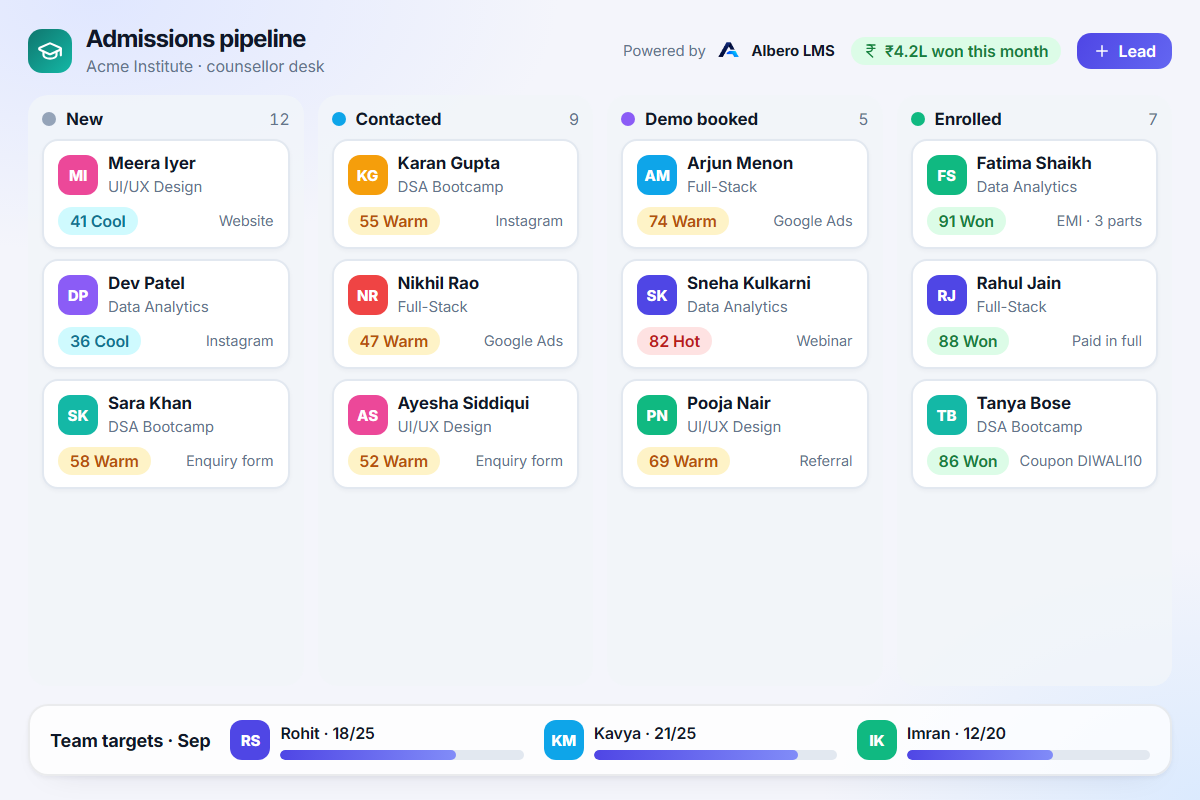
Admissions CRM and counsellors
Fees, EMI and GST invoices
Revenue and retention analytics
For your learners
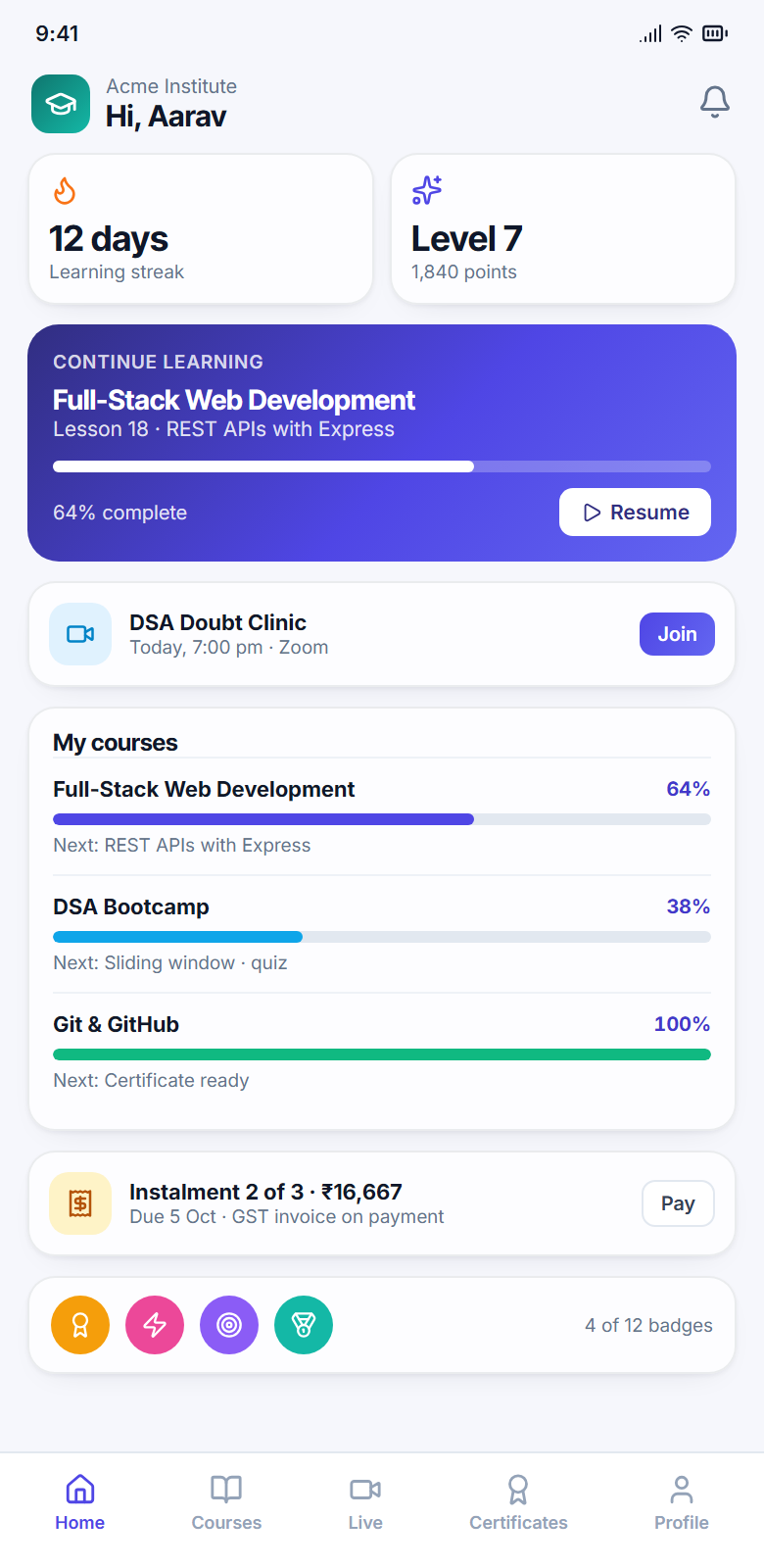
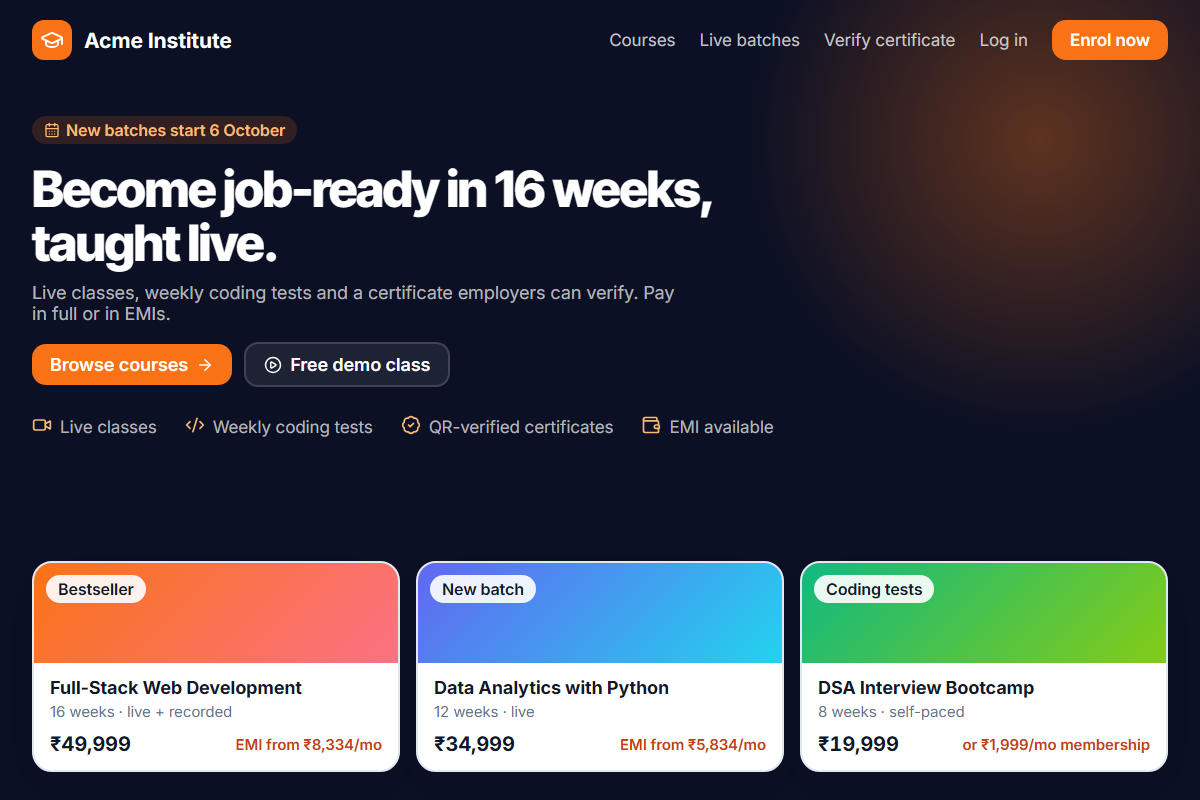
A branded academy under your name and domain
Learners browse your catalogue, check out in their own currency, join live classes and earn certificates anyone can verify. They see your name, logo, colours and domain, and never ours.
Your website and course catalogue
Cart and checkout in 10 currencies
Student portal on any phone
QR-verifiable certificates
The problem
What running an institute on five tools actually costs
Five tools, zero single truth
Content sits on one site, classes on Zoom, leads in a spreadsheet, fees on a payment link and invoices in Tally. Nobody knows which lead became which student.
“Who collected this cash payment?”
Offline fees, EMIs and discounts get agreed on the phone and reconciled at month-end, if they get reconciled at all.
Your brand, someone else’s watermark
Learners sign in on a marketplace, and the certificate they share carries another company’s logo.
The platform
37 modules, one set of records
Grouped by the job they do. Each group is tagged with who it serves: your institute, your learners, or both. Every module reads and writes the same learner, so a lead, an invoice and a certificate are one person’s story.
TeachInstitute + learners
Everything a trainer needs to run a course from first lesson to certificate.
9
Course builder & curriculum
Sections and lessons in any order — video, text, quiz, assignment, PDF — with clone-as-new-version.
Enrolments & access tiers
Free, paid or hybrid courses with access tiers and expiry dates.
Quizzes & tests
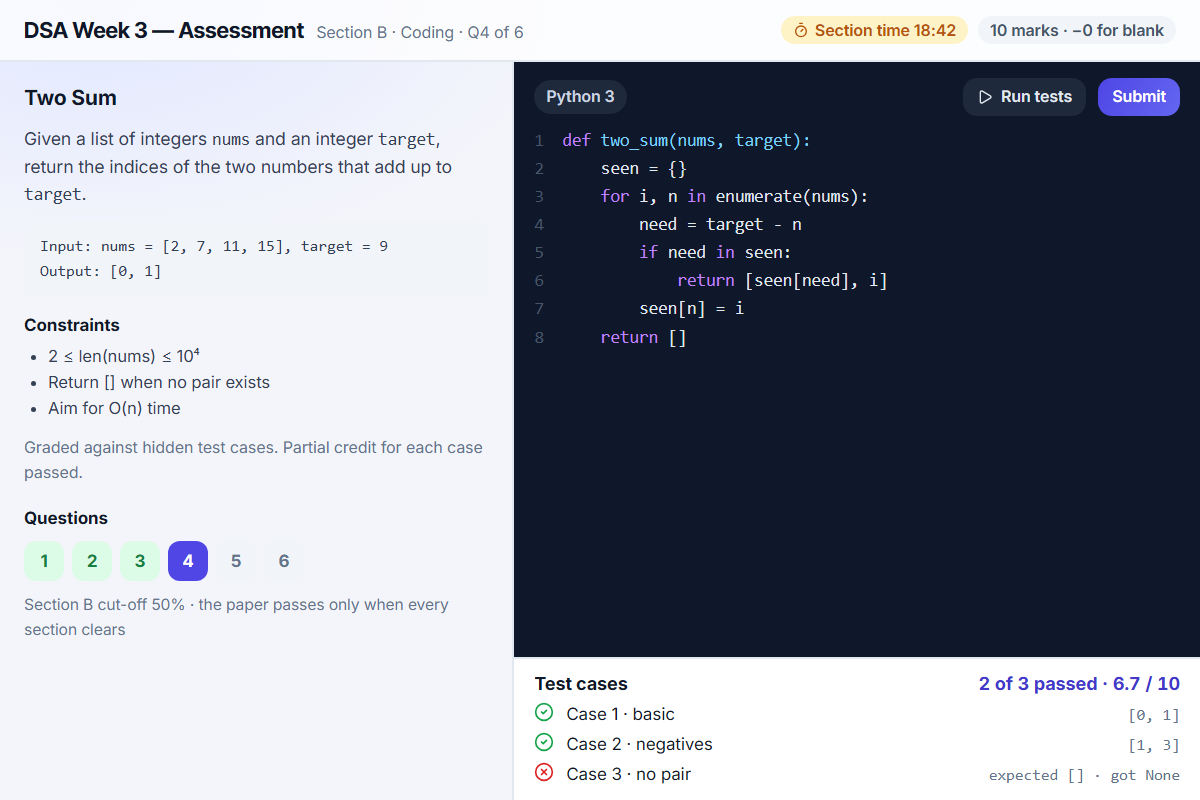
MCQ, multi-select, true/false, fill-blank, numeric, match, written and coding with auto-graded test cases. Question bank, sections, negative marking, randomisation.
Assignments & grading
Submissions, trainer grading and a similarity check that names both sides.
Batches & cohorts
Capacity, trainers and schedules per cohort.
Learning paths & prerequisites
Required and elective items, prerequisite chains and sequential unlock.
Attendance
Registers per batch, percentages and reports, with excused absences left out.
Live classes
Zoom, Google Meet or Teams. Attendance from join and leave times, reminders and recordings.
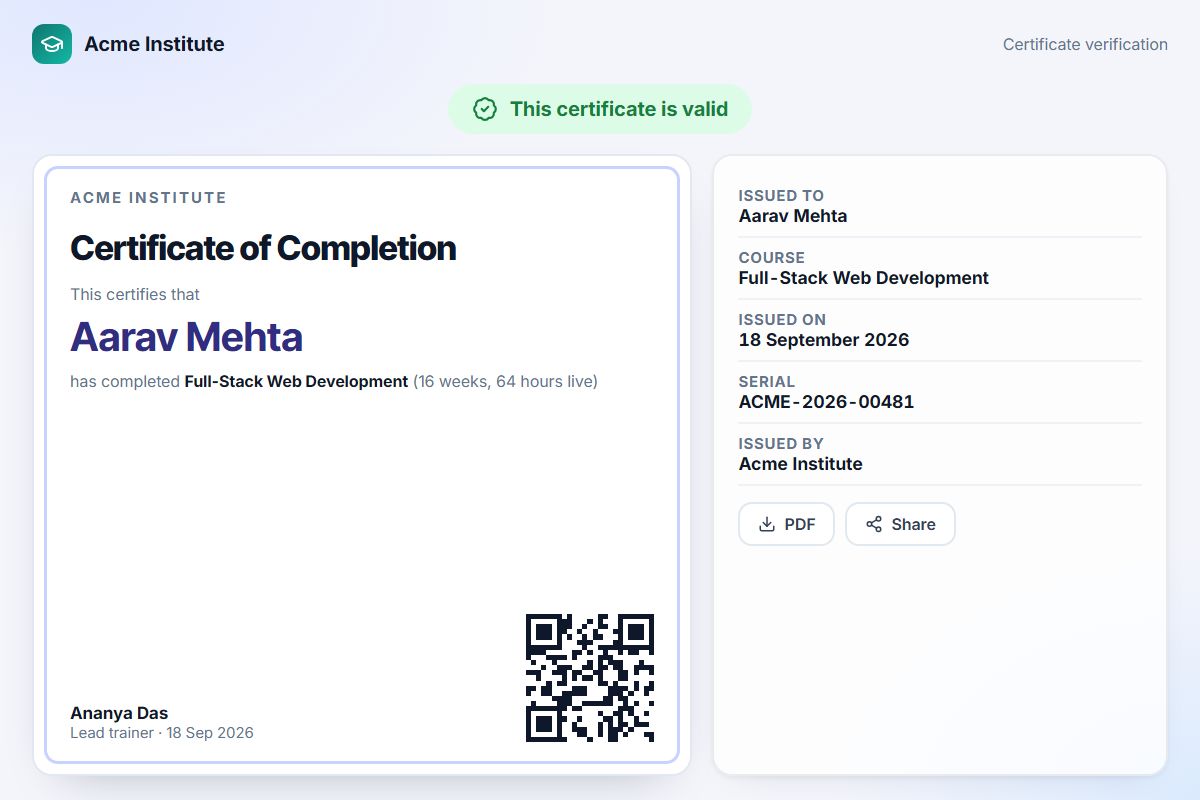
Verifiable certificates
A QR code and a public verify page on every certificate. Revoked ones say so.
EngageInstitute + learners
The reasons a learner comes back tomorrow.
8
Progress tracking
Lesson progress and resume position, for the learner and the trainer.
Leaderboard
Learners ranked on the points they earn.
Points, levels, badges & streaks
Awarded for lessons, tests, assignments and attendance. Retry-safe, never double-counted.
Course & batch discussions
Threads, upvotes and accepted answers, visible only to enrolled learners.
Notes & bookmarks
Private notes pinned to a moment in a video.
Direct messages
One-to-one chat with trainers and cohort-mates, with block and report.
Refer & earn
Learners invite friends, and every referral is tracked.
Support tickets & doubt desk
Doubts and issues in a queue, so nothing lives in a DM.
SellInstitute
Every way an institute takes money, reconciled to the same invoice.
6
Online payments
Razorpay checkout in ten currencies, each with a price you type per country.
Coupons
Percentage or fixed, with windows, caps and per-learner limits.
Course bundles
Several courses at one price. Courses a learner already owns are skipped.
EMI / instalment plans
Every part invoiced up front with a due date, and chased when overdue.
Memberships & subscriptions
Monthly, quarterly or yearly access to a course set, with trials and grace days.
Affiliate programme
Partner codes, commission on net sales, and payouts with a reference.
GrowInstitute
From an enquiry form to an admitted student, with nothing in a spreadsheet.
7
Counsellor desk & lead pipeline
Lead scores with their reasons, duplicate detection and a call log.
Enquiry forms
Capture leads from your site and assign them round-robin.
Sales funnel & counsellor targets
Conversion by stage, and targets per counsellor and team.
Newsletter & campaigns
Send to a named segment, such as learners with an abandoned cart.
Website builder (CMS)
Your public site and course pages, on your own domain.
SEO & UTM tools
Page meta, and campaign links you can trace back to an enrolment.
Demo mode & free-trial funnels
Let a prospect try a course before they pay for it.
RunInstitute
The controls behind the other four groups.
7
Multi-branch & multi-campus
Branch admins, and learners and batches scoped to their branch.
Content library
Upload once, reuse anywhere. Assets in use cannot be deleted.
Automation workflows
Trigger, condition, action — including learners going quiet and invoices going overdue.
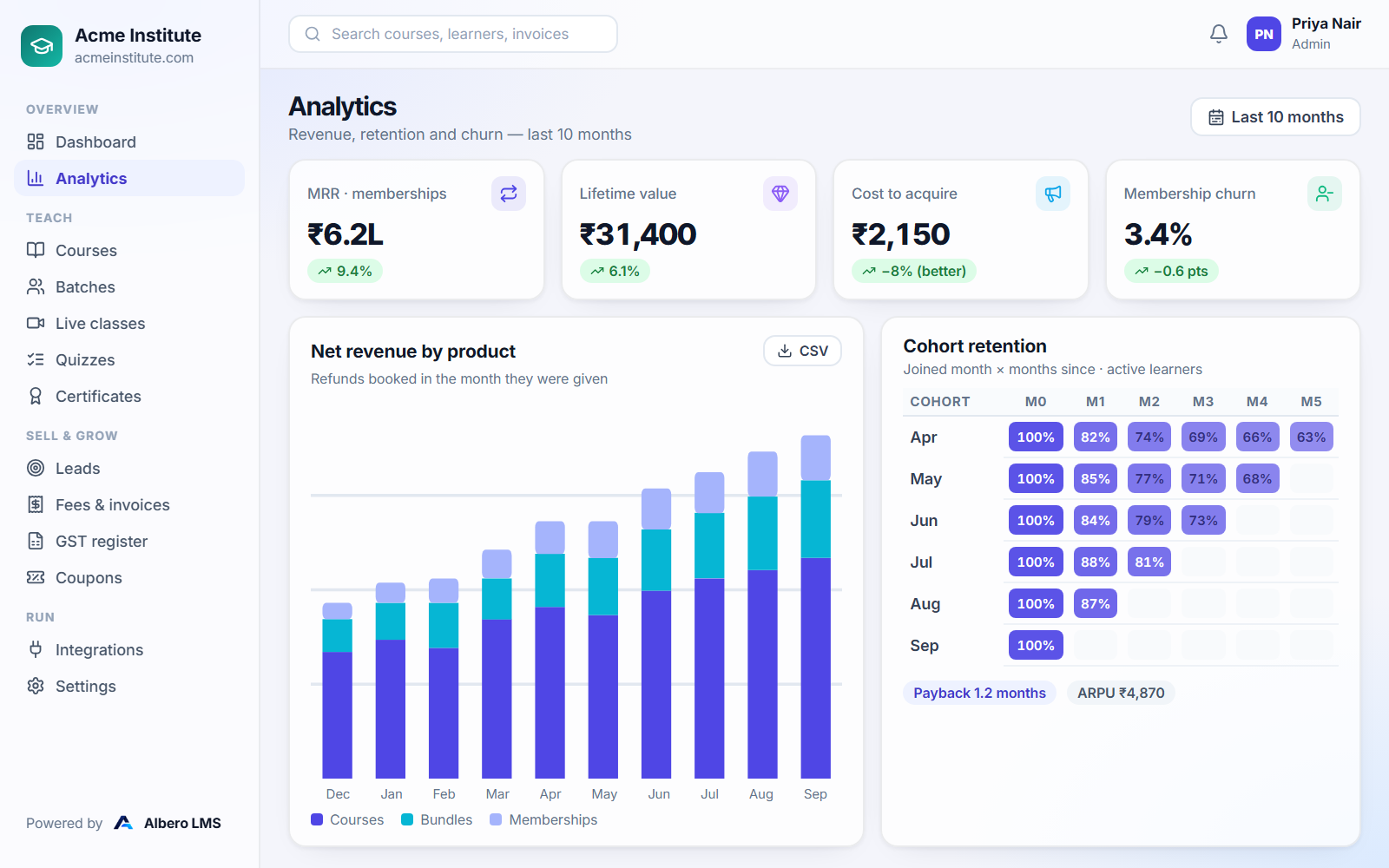
Analytics
MRR, LTV, CAC, cohort retention and churn, exported to CSV.
Integrations & webhooks
Twelve connectors and signed outbound webhooks.
Audit log
Who changed what, and when. Append-only.
Settings, branding & custom domain
Your name, logo, colours and domain across every screen.
Also built in, not sold separately
GST engine — tax invoice, bill of supply and export invoice; CGST/SGST/IGST split; GST register with CSV export
Cart & abandoned-cart recovery
Public events & webinars
Organisation chart
Two-factor authentication
For service providersService providers
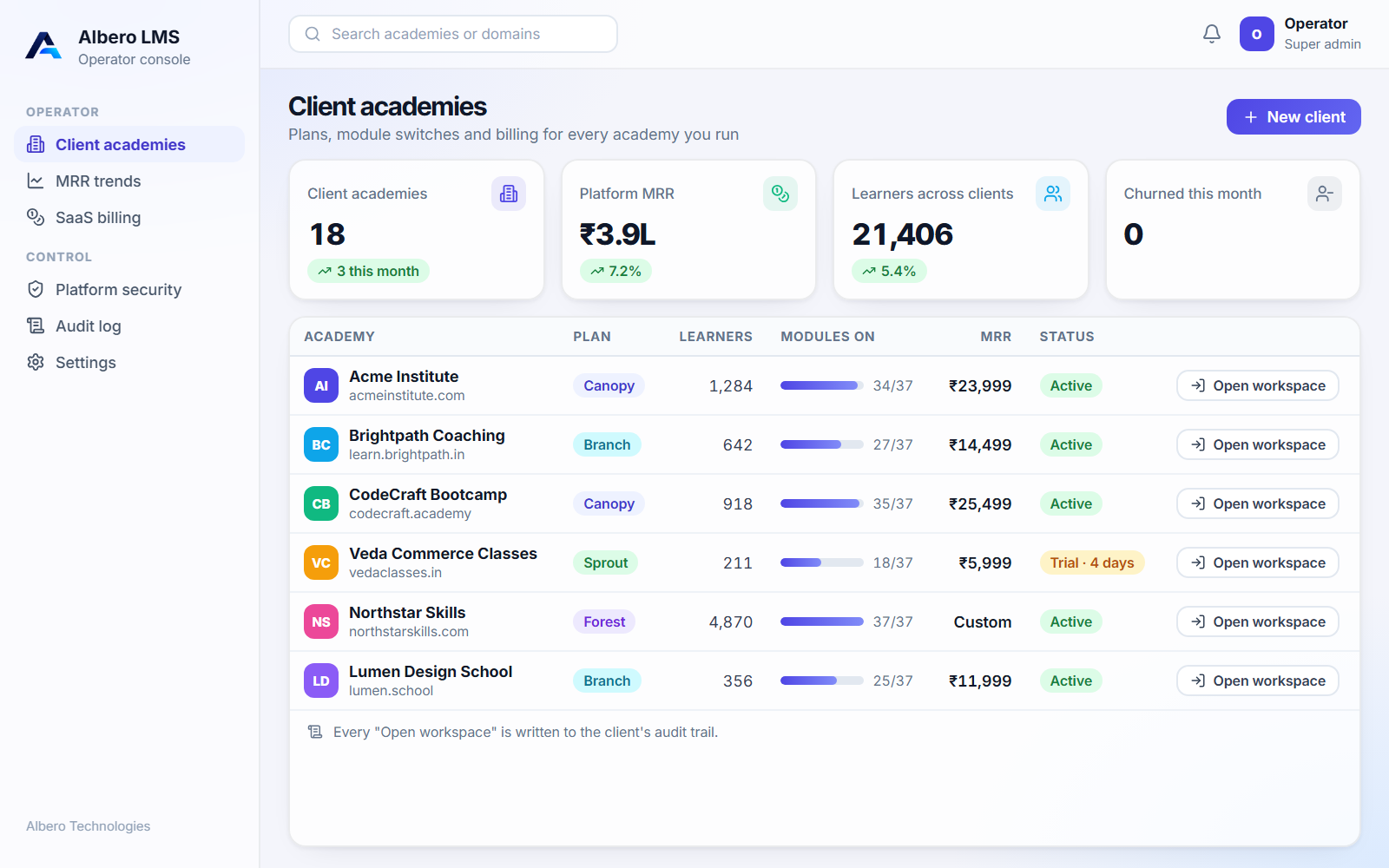
An operator-only console for Albero or a partner running academies for many clients.
5
Client workspaces
Provision, suspend and brand an academy per client.
Per-client module switches
Turn any of the 37 modules on or off per client, enforced on the server.
SaaS billing & MRR trends
New, expansion, contraction and churned MRR, snapshotted nightly.
Platform security view
Security posture across every workspace you run.
Open workspace
Step into a client’s panel to support them. Every entry is written to their audit trail.
Product tour
A workspace your team runs the business from, and an academy your learners actually finish
For your instituteFor your learners
For your institute
Revenue, retention and churn, from your own data
Net revenue by product each month, with refunds booked in the month they were given.
Cohort retention, LTV, CAC and payback period, without a spreadsheet.
Every chart exports to CSV.
Product demo
See a whole admission-to-certificate journey in three minutes
Build a course, run a live class, convert a lead and collect a fee with a GST invoice, all in one workspace.
1Course builder
2Live class
3Lead → student
4Checkout & GST invoice
5Certificate
Role-aware access
The same platform, seven different workspaces
What someone sees is decided by their role, and enforced on the server. A trainer sees their own batches, a counsellor their own leads, and a learner their own fees.
Super Admin
The operator. Runs client workspaces, plans and module switches from the operator console.
Admin
An institute’s owner. Everything in the workspace, including money, analytics and integrations.
Trainer
Builds courses, runs live classes and grades tests for their own batches.
Counselling Manager
Owns the admissions team: leads, targets, tasks and team reports.
Counsellor
Works their own leads and raises offline payment requests for approval.
Support
Runs the ticket and doubt desk, with read access to help learners find things.
Student
Learns, takes tests, joins classes, pays fees and collects certificates.
What each role inside an institute can do
Capability
Admin
Trainer
Couns. Mgr
Counsellor
Support
Student
Build courses & lessons
Quizzes, assignments, grading
Takes
Live classes & attendance
View
View
View
Joins
Leads & admissions pipeline
Own leads
Fees, invoices, refunds
Requests
Requests
Own
Coupons, bundles, memberships
View
View
View
Buys
Analytics & integrations
Tickets & doubts
Raises
Raises
Raises
Raises
Scroll the table sideways on a narrow screen.
Security & compliance
Written for the person who reviews it
Below is what is running today, described precisely enough to check. What is not built is listed underneath rather than left out.
Tenant isolation
Every record carries its institute’s ID, and every query filters on it.
Append-only audit trail
It records who changed what, including actions taken while an operator is inside a client workspace.
Two-factor authentication
TOTP (RFC 6238), ten single-use recovery codes, and a used code is refused if replayed.
Short-lived sessions
15-minute access tokens and rotating httpOnly refresh tokens. A password or role change signs out every device.
Passwords and sign-in limits
Passwords are hashed with bcrypt. Sign-in is limited to 5 attempts per 15 minutes per email, plus a per-IP limit.
Encrypted credentials
Integration secrets and 2FA secrets are encrypted at rest with AES-256-GCM.
Signed webhooks
Payment webhooks are HMAC-verified. Outbound webhooks refuse private and loopback addresses.
Role-based access
Seven roles across about forty permission areas, enforced on the server. The UI only hides what the server already refuses.
Learner safety
Block and report in messaging. A report keeps a snapshot of the message, and its resolution is audited.
Privacy by design
A learner’s notes are private by construction, with no staff view. Webcam proctoring is held back until consent, retention and deletion are in place under the DPDP Act.
On the roadmap, not available today
We hold no security certification, and we will not imply one. If any of the following is a requirement for you, it is a reason to wait rather than a reason to sign.
SSO / SAML sign-in
SCORM / xAPI / LTI
Native iOS & Android apps (PWA today)
Webcam proctoring
DRM & screen-capture blocking
Multi-language / RTL
Corporate compliance-training hierarchy
WhatsApp/SMS workflow actions
Public API keys
SOC 2 certification
AI
AI is next, and we’ll only ship it when it has something real to read.
On the roadmap · not available today
Albero LMS already stores the structured material an AI tutor needs: courses, question banks, transcripts and attempt history. The planned order is:
Question drafting from your own lessons
Rubric-assisted grading of written answers
At-risk learner alerts
Admins can already connect an Anthropic account under Integrations.
Integrations
Twelve connectors, all of them working
Classes, mail, chat, payments and sheets, wired to the same learner records. Credentials are verified when you connect and encrypted at rest. This is the whole list.
Zoom
Live class links created from your account, with attendance from join and leave.
Google Workspace
Google Meet links for live classes, and calendar and directory access.
Microsoft Teams
Teams meeting links for live classes, created from your tenant.
Microsoft 365
Read your staff directory and put live classes on Outlook calendars.
Gmail
Invitations, receipts and reminders sent from your own address.
Slack
Enrolments, payments and enquiries posted to a channel.
WhatsApp Business
Event notifications to a learner’s own number.
Razorpay
Checkout, EMI parts and memberships, settled by a signed webhook.
Stripe
Connect and verify your Stripe account alongside Razorpay.
Google Sheets
Every new enquiry and enrolment appended as a row in your sheet.
Anthropic
Connect your own account now, ready for the AI features on the roadmap.
Webhooks
Any event to any endpoint, signed with HMAC-SHA256.
Industries
The part that is different in your sector
Most of running an academy is the same everywhere. These are the parts that are not, and how the platform is configured for them.
Coaching & test prep
Sectioned papers with cut-offs, negative marking, randomised draws and leaderboards.
Coding bootcamps
Coding questions auto-graded against test cases, cohorts, and assignment similarity checks.
Skill & certification academies
Verifiable QR certificates, and learning paths with prerequisites.
Schools & colleges
Batches, attendance thresholds per institute, and fee receipts parents can read.
Multi-campus & franchise
Branch admins, branch-scoped learners and batches, and per-branch reporting.
Creators & ed-tech brands
Website builder, custom domain, memberships and affiliates.
Training companies selling to employers
B2B GST invoices carrying the buyer’s GSTIN, and course bundles.
International academies
Ten currencies with a price typed per country (never auto-converted), and export invoices.
Coding tests that grade themselves
Each answer runs against test cases you write, with partial credit for every case passed.
Papers split into timed sections, each with its own cut-off.
A random draw from your question bank for each candidate, with shuffled options.
Migration & onboarding
Three steps, and no big-bang cutover
Keep teaching on your current setup until the new academy looks right. Point the domain last.
01
Import your catalogue
Courses, lessons and question banks. A 68-question starter pack is included, so the bank is never empty on day one.
02
Invite your team and learners
Role invites for staff, invite links for counsellors, and bulk enrolment for learners.
03
Point your domain
Set your branding and website pages, connect your payment gateway, and go live.
Most institutes go live within a week. On Canopy and Forest, migration is done with you.
Albero Academy runs its own courses on Albero LMS.
Our own academy is the platform’s first customer: its courses, live classes, admissions and fees all run on the same workspace you would get. Your learners only ever see your brand.
Pricing
One flat monthly price per institute, with security included
No per-learner fees. Pick the plan that matches how much of the business you want on one platform.
7-day free trial, no card needed. Prices exclude 18% GST. Gateway charges are billed by your gateway. Any module outside your plan can be added on.
Every plan includes the same security baseline: tenant isolation, the append-only audit trail, two-factor authentication and role-based access. None of it sits behind a higher tier.
Questions
Answered as we would answer them on a call
Including the ones where the honest answer is “not yet”.
You own every course, video, question and learner record. We host it for you.
Book a demo
See it with your own courses and your own fee structure.